01 - Introduction
GroupNote - AI-native collaborative learning
Most case studies you read are success stories. This one is not.
Groupnote is a learning platform meant to pair collaborative note-taking with native AI support. Technically, it is the most ambitious system I have designed: a notes engine built on polymorphic jsonb, real-time sync that often bypassed the backend, and custom LLM orchestration (Gemini) in a Python microservice talking to the .NET monolith, with a React frontend.
It looked like a post-seed SaaS: shared editors, an AI tutor, quizzes, flashcards, and a full limits and subscription system.
The problem? I never shipped it.
This case study is about pairing modern architecture with the classic "Founder Trap" - severe scope creep and building a large system before validating a small MVP. It is the project that taught me to think like a product engineer, not only like a programmer.
Status: Archived (never published publicly).
Role: Full-Stack Developer & Product Owner
Goal: Build an AI-native learning environment where AI turns notes into quizzes, flashcards, and interactive tutor sessions by design.
Tech stack
Backend & architecture (modular monolith)
C# / .NET 9 (Minimal APIs, CQRS with MediatR, FluentValidation)
PostgreSQL (heavy use of jsonb for the block editor document model)
Redis (caching)
Frontend & UX
React 18 & Vite 5 (TypeScript)
TanStack Query (data fetching & state management)
Radix UI & Tailwind CSS (design system)
Framer Motion (micro-interactions)
Real-time & AI layer
Supabase (Auth & Realtime postgres_changes for live note sync)
Python microservice (Gemini API integration, isolating AI orchestration from .NET domain logic)
Docker & Aspire AppHost (local orchestration of the full stack)
02 - Problem & Idea
The Idea: From a knowledge warehouse to an active learning environment
Most mainstream note-taking tools (Notion, Microsoft OneNote, Evernote) are optimized for one primary job: knowledge storage. They behave like infinite digital filing cabinets.
For learners, merely "saving" information is only the start. Real learning requires active processing. We observed that the typical study workflow was ~80% tedious prep:
retyping notes from the board or paper notebooks into a computer,
manually extracting definitions and turning them into flashcards (e.g. in Anki),
writing your own quiz questions just to practice before an exam.
Problem: The tools we used forced us to jump across four different apps before we could even start learning.
The core idea behind Groupnote boiled down to one question:
What if AI could turn your static notes into a complete, interactive learning environment?
Instead of bolting on a chatbot, we treated AI as a native engine for the whole product. We wanted to flip the ratio - the system would absorb ~80% of prep work so students could focus on actually learning.
We designed a workflow that removed friction end to end:
Low-friction digitization (OCR to blocks): Snap a photo of a handwritten page. Through AI plus S3 buckets, we not only extract text but map it into our polymorphic block model - headings, lists, even math.
Import modal: image/PDF upload, OCR path into the native block tree (Images vs PDF tabs). Note completion: While typing, AI suggests the next span - a GitHub Copilot-style loop for notes. Accept with Tab or keep typing to reject.
Smart Completions: inline ghost text, Tab to accept - same muscle memory as IDEs, grounded in note context. In-editor help: Highlight a fragment and run Explain or Correct - no tab switching, no second context.
Selection menu: Lernie Explain and Correct against math blocks - inline, in-place. Active learning in one click: Finish a topic and press one button. The system reads your note context and generates flashcard decks, a full quiz, or open-ended questions.
Shared knowledge (multiplayer): All of this runs in real time inside a group space where classmates collaborate on the same document.
Product shell: group context, module tabs (Dashboard, Notes, Quizzes, Lernie), shared editor - the multiplayer layer on top of sync.
Groupnote was not meant to be where you "store" notes. It was meant to be where you "learn from" notes.
Import path: from a photo of handwritten notes straight into the editor's native block graph.
Select text and immediately reach AI (Explain, Correct, Flashcards) - zero context switching.
03 - Product & Features
Product Features: The Learning Engine
The core: block-based editor
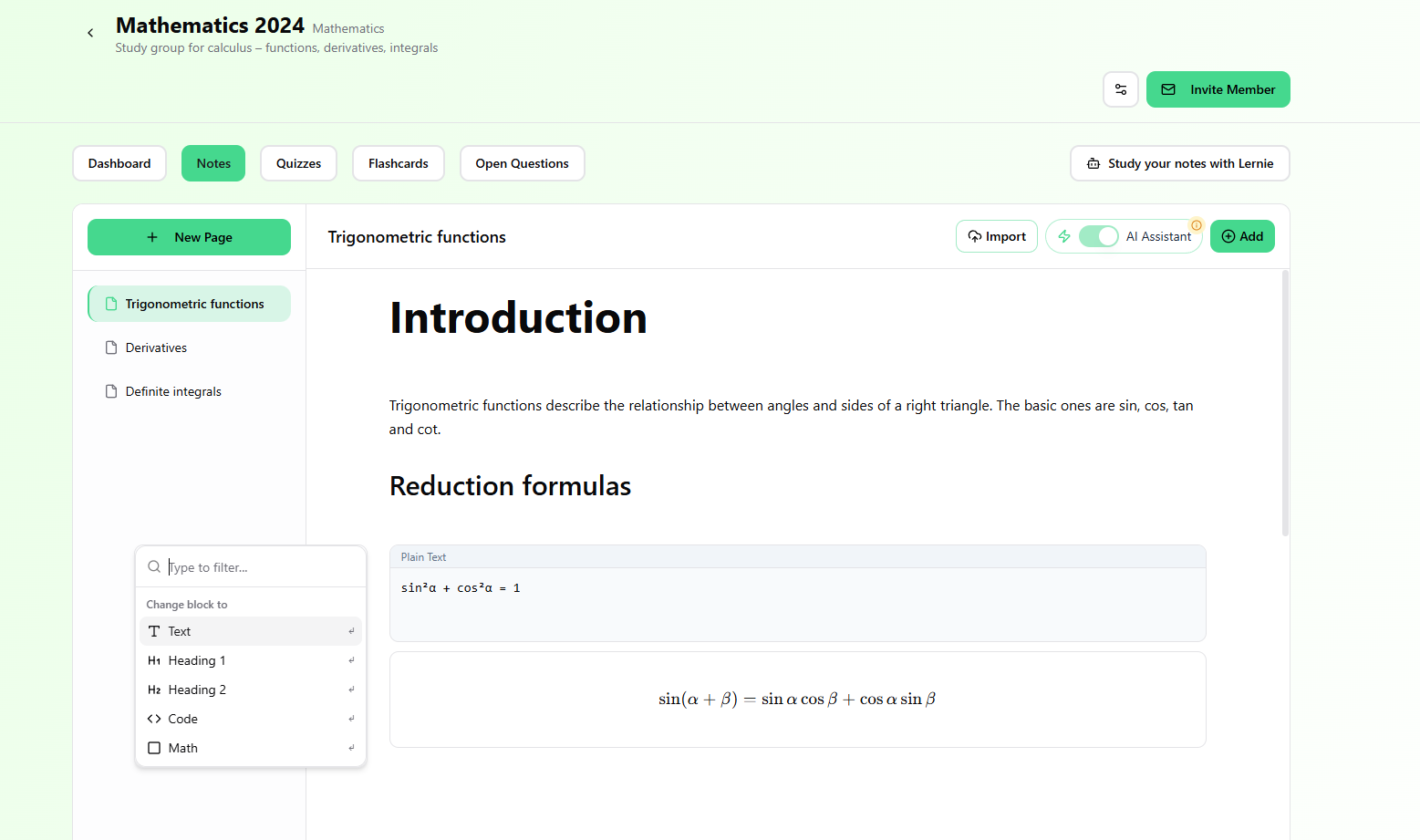
The heart of Groupnote was a first-party block editor (inspired by Notion). We refused to ship a plain textarea or a blob of raw HTML.
Every note element was an independent block stored in PostgreSQL as polymorphic jsonb. That unlocked:
Rich text with inline formatting,
Code blocks with language selection and syntax highlighting,
Math blocks with native equation rendering,
Image blocks backed by S3 buckets,
Lists, headings, and tables validated on the backend.
Block semantics let the server understand the document graph - essential for later feeding structured context into AI pipelines.
Ideal visual: editor canvas showing mixed block types (code + math).
One surface for text, code, math, and media - all typed in jsonb.
The editor also shipped an AI Writing Assistant with inline Smart Completions - accept with Tab without leaving the note.
Zero-friction digitization (AI OCR)
The worst friction in studying is often day one - retyping paper notes. We built a pipeline that removed it entirely.
Snap a photo of a handwritten page. Files land in S3, then models infer structure - not flat OCR text. Headings, lists, and even sketched equations map into native math blocks.
Pair with the import / OCR modal flow.
Handwriting becomes first-class blocks instead of a pasted wall of text.
Once handwritten content becomes structured blocks, the next step is contextual AI support directly inside the reading and writing flow.
Context-aware AI (Explain & Correct)
We did not want learners opening a new ChatGPT tab for every confusion. AI lived inside the editor chrome.
Selecting text opened a popover with Explain for concepts and Correct for cleanup - always scoped to the passage in view, preserving flow.
Visual: selection + Lernie actions in place.
Hard ideas clarified without leaving the note.
The study factory (quizzes, flashcards, open questions)
This is where Groupnote became a real EdTech surface. Notes were inputs. One command analyzed the document and emitted active-learning artifacts:
AI flashcards: decks from the densest definitions.
AI quizzes: multiple-choice checks for fast validation.
Open-ended sets: our deepest pedagogical bet - the model wrote prompts, graded prose answers, surfaced rubric-style feedback, and showed a model solution.
Static notes became interactive study kits in seconds.
"Lernie" - your AI tutor
When decks were not enough, learners opened a side panel and talked to Lernie with full-note context - no copy-paste. Tone presets (Casual, Academic, Professional) shaped whether answers felt like a lecturer or a study buddy.
Placeholder for a future sidebar chat capture.
Lernie keeps the entire note in working memory and matches the voice you pick.
Real-time multiplayer
Study is social. Supabase Realtime let cohorts co-edit the same page, see cursors, and stream edits without reloads.
Group learning
Invites, shared libraries of notes/quizzes/flashcards/open sets, and subscription economics that could split across friends - same mental model as Spotify or Netflix family plans.
04 - System Overview
Technical Architecture: The engine room
Architectural thesis: pragmatism over hype
A system that combines collaborative editing, AI workflows, and group study can quickly fall into hype-driven development and split into fifteen services too early.
I chose a modular monolith for the core API, a dedicated AI microservice, and direct realtime delegation to the data layer. That gave us fast iteration with clean code boundaries and an upgrade path for scaling.
The diagram captures independent responsibilities per layer while keeping contracts explicit across HTTP and data boundaries.
System-layer stack
Backend (.NET 9) with vertical slices and CQRS
The core API runs on ASP.NET Core 9. Instead of classic horizontal layering, the monolith is organized into vertical slices and domain modules: Users, Groups, Notes, Quizzes, Tutor, AI, RecentActivity.
CQRS + MediatR: explicit command and query flows per use-case.
Validation + rate limiting pipelines: guardrails execute before handlers.
DDD boundaries: each module keeps its own entities, errors, and contracts.
public sealed record CreateQuizCommand(Guid NoteId, Guid UserId)
  : IRequest<CreateQuizResponse>;

public sealed class CreateQuizCommandHandler
  : IRequestHandler<CreateQuizCommand, CreateQuizResponse>
{
  public async Task<CreateQuizResponse> Handle(
    CreateQuizCommand command,
    CancellationToken ct)
  {
    // validation + plan limits run in MediatR pipeline
    var note = await notesRepository.GetAsync(command.NoteId, ct);
    var quiz = await aiOrchestrator.GenerateQuizAsync(note, ct);
    return await quizzesRepository.SaveAsync(quiz, command.UserId, ct);
  }
}
AI orchestration pattern (.NET -> Python)
The most important decision was keeping LLM SDK code out of .NET. The AI module acts as an orchestrator and uses IHttpClientFactory to talk to a dedicated Python service.
Python handles Gemini model calls, prompt shaping, OCR, and response normalization to JSON. .NET remains the system of record for authorization, billing, limits, and persistence.
orchestration:
  entrypoint: dotnet_ai_module
  transport: http_internal
  python_service:
    endpoint: http://python-ai:4000
    models:
      ocr: gemini-1.5-pro
      tutor_chat: gemini-1.5-flash
  response_contract:
    format: json
    persisted_by: aspnet_api
Infrastructure and local development
Local infrastructure was composed through .NET Aspire (AppHost) and Docker, so API, PostgreSQL, Redis, and Python AI service could boot together with one command.
That gave every developer the same runtime behavior and a more predictable path from local setup to test environments.
05 - Notes Engine
Notes Engine: Building a polymorphic block system on PostgreSQL jsonb
This section is the core technical payload of the case study. Groupnote notes are powered by independent blocks instead of one long HTML blob.
Why HTML/Markdown as TEXT is the wrong abstraction
A classic WYSIWYG + HTML-in-TEXT works for simple publishing, but it fails quickly for realtime collaboration and AI-first workflows.
Nested HTML parsing wastes tokens and increases model error risk.
Document semantics (headings, code, math, media) collapse into one opaque string.
Partial realtime updates become conflict-heavy at group scale.
We switched to a block-based model inspired by Notion, where each unit carries its own ID and type.
Domain model in C#
The backend uses a polymorphic hierarchy so we can add block types without redesigning the entire domain.
// Base class for every editor element
public abstract class NoteBlock
{
    public string Id { get; set; } = Guid.NewGuid().ToString();

    [JsonPropertyName("type")]
    public string Type { get; set; } = string.Empty;

    public DateTime CreatedAt { get; set; }
    public DateTime UpdatedAt { get; set; }
}

public sealed class TextBlock : NoteBlock
{
    public TextBlock() => Type = "text";
    public string Content { get; set; } = string.Empty;
}

public sealed class CodeBlock : NoteBlock
{
    public CodeBlock() => Type = "code";
    public string Language { get; set; } = "plaintext";
    public string Code { get; set; } = string.Empty;
}public sealed class Note
{
public Guid Id { get; set; }
public string Title { get; set; } = string.Empty;
public List<NoteBlock> Content { get; set; } = new();
public Guid UserId { get; set; }
public Guid GroupId { get; set; }
}Persistence: PostgreSQL jsonb + EF Core
Separate relational tables per block type would be over-engineering for this stage. We used jsonb with EF Core + Npgsql conversion hooks.
// NoteConfiguration.cs
builder.Property(x => x.Content)
    .HasColumnType("jsonb")
    .IsRequired()
    .HasConversion(
        v => JsonSerializer.Serialize(v, serializerOptions),
        v => JsonSerializer.Deserialize<List<NoteBlock>>(v, serializerOptions)
             ?? new List<NoteBlock>()
    );
Polymorphic deserialization
Correct type mapping from JSON to C# classes is critical. We used JsonTypeInfoResolver so `code` materializes as `CodeBlock`, while `text` maps to `TextBlock`.
[
  {
    "id": "blk-123",
    "type": "heading1",
    "content": "CPU architecture"
  },
  {
    "id": "blk-456",
    "type": "text",
    "content": "Processors are built from registers and an ALU."
  },
  {
    "id": "blk-789",
    "type": "image",
    "url": "https://storage.supabase.co/...",
    "description": "ALU block diagram"
  }
]
Why this unlocked the product
AI context parsing: backend sends predictable JSON so models can focus on relevant block types.
Realtime sync: frontend updates a specific block instead of overwriting a full document, which reduces group editing conflicts.
06 - Realtime & Sync
Real-time System: Scaling by bypassing the backend
This section covers a key architectural move: realtime traffic bypasses the .NET API, so the backend stays stateless and focused on business logic.
Classic trap: why not default to SignalR
The default .NET instinct for collaborative editing is SignalR. In this MVP, that would force the API to hold state for high-frequency keystroke events.
That quickly turns into a memory bottleneck and expensive horizontal scaling. We intentionally removed realtime load from the C# API.
Direct-to-database architecture
Instead of a custom event broker, clients subscribe directly to postgres_changes via Supabase Realtime. From the API perspective, realtime synchronization does not exist.
Practical flow: frontend writes and debouncing
Debounce protects the database from per-keystroke writes while keeping local typing feedback instant.
Learner edits a TextBlock and sees local state update immediately.
After 1 second of inactivity, frontend sends a single UPDATE to the note row.
Supabase detects the DB change and broadcasts it to every subscriber.
const channel = supabase
  .channel(`note_${noteId}`)
  .on(
    "postgres_changes",
    {
      event: "*",
      schema: "public",
      table: "Notes",
      filter: `Id=eq.${noteId}`,
    },
    (payload) => {
      if (payload.new) {
        updateLocalState(payload.new.Content);
      }
    }
  )
.subscribe();const persistNote = debounce(async (noteId: string, content: NoteBlock[]) => {
await supabase
.from("Notes")
.update({ Content: content, UpdatedAt: new Date().toISOString() })
.eq("Id", noteId);
}, 1000);
const presence = supabase.channel(`presence_note_${noteId}`, {
config: { presence: { key: userId } },
});Single Source of Truth
The biggest win is data consistency. Frontend and backend write to the same Notes table and Supabase pushes changes automatically.
Clients do not need to know whether an update came from another learner or from an async AI process such as OCR.
Net result of the decision
Lower latency - no extra hop through the app server.
Lower infra cost - .NET API stays lean and business-focused.
More stable multiplayer behavior out of the box.
07 - AI Layer
AI System: Orchestration, RAG, and AI Copilot
Separation of concerns: .NET orchestrator, Python AI engine
Groupnote was designed as AI-native without embedding LLM SDK complexity directly in ASP.NET Core controllers.
ASP.NET Core monolith: system of record, authorization, quotas, business logic, persistence.
Python microservice: prompt shaping, Gemini calls, structured JSON responses.
Orchestration flow (IHttpClientFactory + MediatR)
Frontend sends a generation request to .NET API.
Backend checks plan quotas in Redis.
Handler collects note context (jsonb) and delegates to Python over HTTP.
Python returns typed DTO payload and .NET persists the output.
public async Task<Result<QuizDto>> Handle(
    GenerateQuizCommand command,
    CancellationToken ct)
{
    var limits = await limitsService.GetForUserAsync(command.UserId, ct);
    if (!limits.CanGenerateQuiz) return Result.Fail(AiErrors.LimitExceeded);

    var note = await notesRepository.GetAsync(command.NoteId, ct);
    var request = QuizGenerationRequest.From(note.Content);

    var dto = await aiHttpClient.PostAsJsonAsync<QuizDto>(
        "/api/quiz/generate",
        request,
        ct);

    await quizzesRepository.SaveAsync(dto, command.UserId, ct);
    return Result.Ok(dto);
}AI Copilot and cost guardrails (HybridCache + cooldown)
Note completion is high-frequency and can burn budget quickly, so backend enforces strict cooldown logic before any paid model call.
var key = $"ai:completion:cooldown:{userId}";
var lastCall = await hybridCache.GetOrCreateAsync<DateTime?>(
    key,
    _ => ValueTask.FromResult<DateTime?>(null),
    token: ct);

if (lastCall is not null && DateTime.UtcNow - lastCall < TimeSpan.FromSeconds(30))
{
    return Result.Fail(NoteErrors.CooldownActive);
}

await hybridCache.SetAsync(key, DateTime.UtcNow, token: ct);Tutor memories and personalization via RAG
Lernie gets both note context and user preferences (with consent), which lets responses adapt to tone and learning style.
{
  "userId": "usr_123",
  "memoryContext": [
    "User prefers game-based examples",
    "User struggles with memorizing dates"
  ],
  "tone": "Academic",
  "noteContext": "..."
}One AI layer, multiple product capabilities
Vision/OCR: photo-to-block note conversion.
Generative: quizzes, flashcards, open questions.
Contextual: Explain/Correct and inline completion.
08 - Monetization
Monetization & Cost Control
The multiplayer growth strategy
Building a strong product is one part. In EdTech, finding a scalable business model with price-sensitive users is the harder part.
Groupnote was designed around groups from day one. Instead of strict per-user billing, we used a family-plan style dynamic where one payer can unlock premium value for a shared workspace.
That unlocks a compounding network effect: users invite their peers to maximize shared plan value.
Usage-based pricing and hard AI limits
Model inference costs can spike fast, so unlimited AI at low price points is not viable. We defined Free, Pro, and Ultra tiers with strict usage caps.
In the data model, each plan exposes explicit budget controls:
public sealed class SubscriptionPlan
{
    public string Name { get; set; } = string.Empty;
    public int AiQuizGeneratedLimit { get; set; }
    public int AiFlashcardsGeneratedLimit { get; set; }
    public int AiTutorMessagesLimit { get; set; }
    public int GroupCountLimit { get; set; }
}
Backend rate-limit enforcement via pipeline
Monetization only works if quotas are enforced before requests hit the AI layer. In Groupnote, that guard lived in MediatR via an IRateLimited contract.
public async Task<TResponse> Handle(
    TRequest request,
    RequestHandlerDelegate<TResponse> next,
    CancellationToken ct)
{
    if (request is not IRateLimited limited) return await next();

    var usage = await usageTracker.GetMonthlyUsageAsync(limited.UserId, ct);
    var plan = await plansService.GetCurrentPlanAsync(limited.UserId, ct);

    if (usage.AiQuizGenerated >= plan.AiQuizGeneratedLimit)
        throw new LimitReachedException("AiQuizGeneratedLimit");

    return await next();
}
Stripe integration end-to-end
Frontend starts purchase flow, backend creates Stripe Checkout Session.
Stripe webhook notifies backend on payment/subscription events.
Backend verifies webhook signature, updates UserPlans, and refreshes cache.
var stripeEvent = EventUtility.ConstructEvent(
    json,
    request.Headers["Stripe-Signature"],
    stripeOptions.WebhookSecret);

if (stripeEvent.Type == "checkout.session.completed")
{
    var session = stripeEvent.Data.Object as Session;
    await plansService.ActivatePlanAsync(session!.CustomerId, ct);
    await usageCache.InvalidateAsync(session.CustomerId, ct);
}
The outcome: real billing readiness from day one with an automated paid-user onboarding path.
09 - What went wrong?
What went wrong: The "just one more feature" trap
Engineering win, product failure
Technically, Groupnote worked. The architecture held, realtime stayed stable, and the AI layer handled complex workflows.
Product-wise, it failed to launch because I kept building in isolation before validating a true MVP.
Original MVP vs what I actually built
The initial plan was simple: shared notes and one AI quiz button. That was enough to validate demand with real students.
Instead, the architecture made adding modules so easy that scope kept expanding.
What shipped in code instead of MVP:
full block editor with LaTeX, code, and media,
Lernie tutor with memory and early RAG,
OCR import pipeline,
flashcards and open-question generators,
subscription logic, AI usage tracking, and group invitations.
Founder trap and illusion of progress
Every new module felt like momentum. In reality, it was textbook Scope Creep: emotionally rewarding, product-risky.
“Just flashcards”.
“Just open questions”.
“Just OCR”.
[ moment of truth ]
The weight of my own ambition
At some point, operating the ecosystem cost more energy than product learning. I built a factory before validating the first skateboard.
10 - Key Takeaways
Key Takeaways: What Groupnote taught me
If I compress hundreds of hours spent on this project into a few lessons, these are the ones I keep using.
01
Product discipline beats scope expansion
A real MVP should feel small, shippable, and optimized for market learning.
02
Pragmatic architecture beats hype
Splitting ASP.NET Core and Python gave a stable System of Record plus a flexible AI layer.
03
Infrastructure leverage compounds delivery
Leaning on Supabase Realtime and PostgreSQL reduced operational drag and increased product velocity.
04
Mindset shift: from code output to user value
Validate demand first, then scale architecture. Shipping > polish. The best code is the one that solves a real user problem.
11 - Final Reflection
Final reflection
Groupnote never became a market success and it never left the development environment publicly.
Even so, I do not regret the work. This project became my proving ground for distributed architecture, realtime collaboration, and AI-native product design.
I stopped thinking like a programmer. I started thinking like a product engineer.
[ moment of truth ]
Today, my first question is no longer "Which architecture should I use?" but "What is the smallest thing I can ship to verify real demand?".
You cannot copy this lesson from a tutorial - you have to build your own Death Star.